

Are you feeling lost in the digital wilderness, struggling to claim your rightful place in the online scene? The competition is fierce, especially for small business owners like you. You’re juggling countless tasks, and amidst all this, your website performance may not be delivering the results you need. Perhaps it’s getting lost in the depths of search engine results, or maybe it’s not as user-friendly as it ought to be. What can you do? Welcome to the world of website migration.
At RD Internet, we understand your struggles. Leveraging our deep knowledge and extensive experience in the field, we have crafted this comprehensive guide to mastering website migration, your essential pathway to the online prominence your business deserves.
Website migration is like changing your vehicle’s tires while driving along a highway—it’s risky and requires careful planning, technical know-how, and precision. Undertaking this process involves significant changes to your website—be it structure, design, technology, or location—that can result in better online visibility. Simultaneously, migration might also affect your SEO and inadvertently lead to temporary drops in organic traffic.
However, fear not! All this is indeed manageable with the right approach. Our team at RD Internet is here to help you mitigate these risks and ensure a smooth transition for your website. We’re pooling together our industry-approved website migration checklist, packed with insights from seasoned SEO professionals, to aid you in this endeavour. Let’s delve into the exciting and highly lucrative world of website migration.
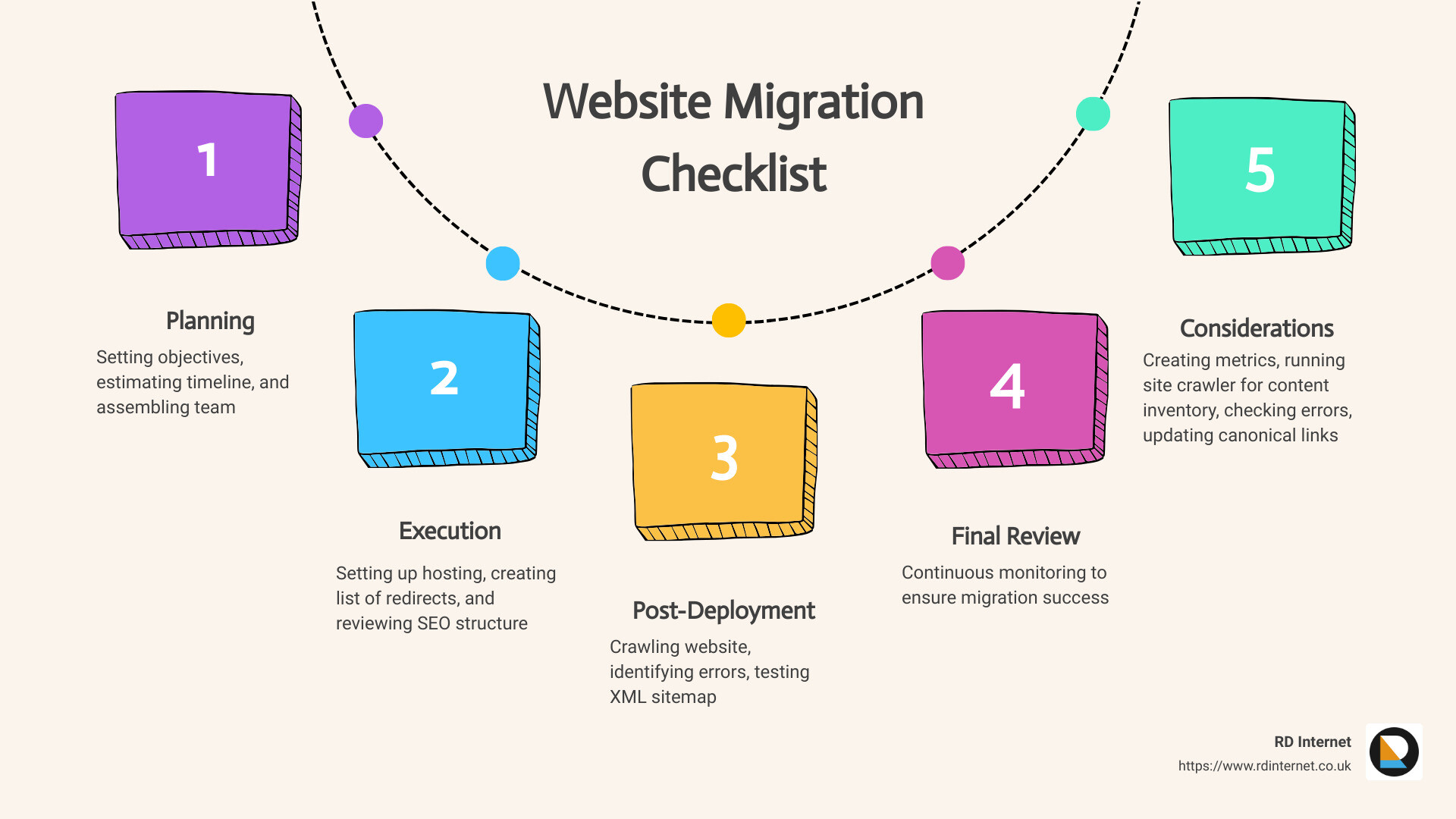
Here’s a quick peek at what’s on our checklist:
- Plan the Move and Benchmark Your Current Site: Set your objectives, estimate the timeline and assemble your dream team.
- Website Migration Execution: Includes setting up hosting, creating a list of redirects, and reviewing SEO structure.
- Post-Deployment Verification and Optimization: Involves crawling the website to identify possible errors and testing your XML sitemap.
- Final Review and Continuous Optimization: Continual monitoring to ensure your migration success.
Few intricate considerations, such as creating metrics and benchmarks, running a site crawler for content inventory, etc., are essential to nail down the specifics beforehand. Furthermore, the execution phase is just as crucial, where you’d be blocking access to your new site temporarily, checking for errors, updating canonical links, and the like.
In the following sections, you’ll find detailed explanations and actionable advice on each of these points to help you execute a successful website migration.
Stay tuned as we navigate this complex yet rewarding journey together. Your online success is closer than you think!
Understanding Website Migration
What is Website Migration?
Website migration is akin to moving house in the digital world. It involves making significant changes to your website’s location, design, structure, or technology. Just like moving to a new home, this process requires meticulous planning and execution to ensure a smooth transition and minimal disruption. In the context of a website, disruptions could mean a drop in online visibility, loss of search engine rankings, or even parts of your website disappearing altogether.
At RD Internet, we see website migration as an opportunity for growth, a chance to optimize and improve your website’s performance, security, and user experience. The process may seem daunting, but armed with the right knowledge and a detailed website migration checklist, you’re already well on your way to a successful site migration.
Common Reasons for Website Migration
The decision to migrate a website isn’t one to be taken lightly. It requires a substantial investment of time, resources, and technical expertise. However, there are several compelling reasons why a business might choose to undertake this challenge.
-
Refreshing your site’s structure, navigation, or design: This is often necessary when your existing design becomes outdated or if your site structure and navigation aren’t crawler-friendly.
-
Moving to a new framework or CMS: This could be due to a desire to enhance your site’s performance, security, or functionality.
-
Adding a mobile version: With the majority of web traffic now coming from mobile devices, having a mobile-friendly version of your site is crucial.
-
Switching from HTTP to HTTPS: This change can enhance the security of your site by encrypting visitors’ information, providing a safer browsing experience and potentially boosting your SEO.
-
Migrating to a new server: This can lead to faster loading times, especially for growing websites, which can improve the user experience and potentially boost your SEO rankings.
-
Changing your domain name: This is often part of a rebranding exercise and requires a site migration.
How Website Migration Can Impact SEO
Many businesses fear that migrating their website will negatively affect their SEO. While it’s true that any significant change to your website can impact your SEO, the outcome can be positive if the migration is carried out correctly.
Google, and other search engines, favor websites that offer a fast, user-friendly experience. Therefore, moving to a faster web host or switching to HTTPS could improve your SEO rankings in the long term. However, because Google has to re-index your site following a migration, it’s normal to see a temporary dip in organic traffic.
The key is to have a comprehensive website migration plan that incorporates SEO best practices. This way, you can maintain your current search engine rankings and set the stage for future improvement. Remember, SEO isn’t an afterthought in the migration process; it’s an integral part that requires equal attention and planning.
As we delve deeper into the world of website migration, we’ll provide you with a detailed checklist to help you navigate this process with confidence and ease. So, hold tight as we continue our journey towards a successful website migration.
Pre-Migration: Planning and Preparation
A successful website migration begins with thorough planning and preparation. Think of this phase as laying the foundation for a house. With a sturdy foundation, the structure above is more likely to withstand external pressures. Similarly, a well-planned pre-migration phase sets the stage for a smooth transition and minimal impact on your existing SEO rankings.
Defining the Scope and Objectives of the Migration
Before you start moving things around, it’s crucial to define the scope and objectives of the migration. Why are you migrating your website in the first place? Are you aiming to boost organic traffic, improve user experience, or enhance your site’s branding? Maybe you’re looking to move your blog from a subdomain to a subdirectory. Whatever the rationale, these objectives will guide your migration strategy.
For example, if you hypothesize that moving your blog from “blog.site.com” to “site.com/blog/” will result in a 10% increase in organic traffic, then that’s a solid, measurable goal. Having such clear objectives allows you to measure the success of your migration efforts and make necessary adjustments if things don’t go as planned.
Assembling Your Migration Team
Website migration isn’t a one-person job. It involves various stakeholders, including SEO specialists, content writers, web developers, UX specialists, data analysts, and the marketing team. Involve these key players early in the process to ensure a smooth transition.
Early involvement of these stakeholders not only secures their buy-in but also allows them to highlight potential implementation challenges. Everyone should be on the same page about the migration plan to avoid last-minute surprises and ensure the migration goes as smoothly as possible.
Creating Metrics and Benchmarks
Next, establish an overview of your current site’s performance. This will serve as a reference point to evaluate the impact of the migration. Pay close attention to SEO metrics such as organic traffic, organic rank, pages crawled, indexable URLs, site structure, and site speed. These metrics will help you identify potential issues that need to be resolved post-migration.
Running a Site Crawler for Content Inventory
A site crawler is an invaluable tool for taking stock of your website’s content. It helps you understand what’s currently on your site, how it’s structured, and how different pages link to each other. This information is crucial for planning your migration strategy and ensuring that all important content is accounted for during the migration.
Setting a Migration Deadline
While website migration can be extensive, it’s important to execute it as quickly as possible to minimize disruption. During the migration, avoid publishing new content or launching new pages. Implementing a content freeze just before and during the migration can be a good first step towards this.
The pre-migration phase is all about setting the stage for a successful website migration. By defining clear objectives, assembling a competent team, establishing benchmarks, running a site crawler, and setting a migration deadline, you’ll be well-prepared to execute your migration strategy. Stay tuned as we delve deeper into the execution and monitoring phase of website migration in our next section.
During Migration: Execution and Monitoring
Migrating a website is akin to moving a house; you have to ensure that everything is packed, moved, and set up perfectly in the new location. Let’s delve into the nitty-gritty of the execution and monitoring phase of website migration.
Setting Up Hosting, DNS, CDN, and Mail
The first step in the migration process is setting up the fundamental components of your website in the new environment. Hosting, DNS, CDN, and mail settings are critical to the smooth operation of your website.
At RD Internet, we start by creating a backup of your website and database. We then set up your hosting environment and transfer all files to your new location. The DNS information is updated, and we modify the CDN and mail parameters. This preliminary setup is crucial to avoid any hiccups during the migration process.
Creating a List of Redirects
Redirects are essential during website migration. They guide your visitors to the correct pages on your new site, preventing any broken links or 404 errors.
We create a comprehensive list of redirects that need to be implemented. This list is continuously referred to during the migration process to ensure all existing redirects are in place on your new site.
Reviewing SEO Structure
SEO is the lifeblood of your online presence. Hence, it is critical to review and maintain your SEO structure during migration.
Our team at RD Internet checks for crawlability, custom URL, alt text, canonical tags, robots.txt, sitemaps, internal links, hreflang, structured data, URL structure, mobile setup, and pagination. We carefully review your current site’s SEO structure to ensure that it is replicated on the migrated site.
Blocking Access to the New Site
Until your website migration is complete, it’s essential to block access to the new site. This prevents search engines from indexing the new site prematurely, which could lead to duplicate content issues and negatively impact your SEO.
Checking for Errors and Updating Canonical Links
Our team at RD Internet diligently checks for any errors and updates canonical links. This ensures that search engines understand the relationship between the old and new URLs, helping to maintain your site’s SEO value.
Performing a Web Accessibility Check
Website accessibility is not just about complying with standards; it’s about ensuring that all your users, regardless of their abilities, can use your website effectively.
A web accessibility check is performed to verify that the new site is accessible to all users. This includes checking for proper use of alt text, legible font sizes, and clear navigation, among other factors.
In conclusion, the execution and monitoring phase of website migration involves several critical steps. At RD Internet, we ensure these steps are carried out meticulously, setting the stage for a smooth transition to your new website. Stay tuned for our next section, where we’ll discuss the post-migration review and optimization phase.
Post-Migration: Review and Optimization
Following the meticulous execution of the migration process, it’s time to shift gears into the post-migration phase. This phase ensures that all the hard work put into the migration doesn’t go to waste. It involves a thorough review and optimization to maintain, and even improve, your SEO rankings. Here at RD Internet, we’ve compiled a checklist of key tasks for this crucial stage.
Updating the Robots.txt File
Once your updated website is live, it’s imperative to revisit the robots.txt file. This text file guides search engine robots on which parts of your site to crawl. Ensure it’s not blocking any critical pages or inadvertently allowing access to sections that should remain hidden.
Crawling the Website to Identify Errors
Immediately after the migration, perform a full site crawl. This helps identify any increase in broken links, error response codes, or other SEO errors. With tools like Google Analytics and Google Search Console, you can quickly spot and rectify any issues, maintaining your SEO standing. 
Checking Analytics Tags
Don’t overlook the importance of analytics tags post-migration. These HTML tags are critical for tracking and reporting on page visits. If these tags are missing, your analytics tool won’t be able to provide valuable traffic data. In our experience, it’s best practice to annotate the migration date in your analytics platform for future reference.
Testing and Submitting the XML Sitemap
The XML sitemap is a crucial index of all available URLs on your site. It guides search engines like Google to discover and scan your pages. If your website structure has changed significantly during the migration, it’s essential to test your sitemap. Once you’ve confirmed it accurately reflects your new site structure, submit your sitemap to Google Search Console or Bing Webmaster Tools to facilitate smooth crawling of your URLs.
Reporting on Benchmark Metrics
Finally, revisit the metrics you collected during the planning stage. Analyzing the web analytics data for the new site and comparing it with your benchmarks will provide valuable insights. If the numbers aren’t in line with your expectations, the benchmark data will guide you in identifying potential issues. Over time, tracking these metrics will help you measure the positive effects of the migration.
In conclusion, the post-migration phase is as crucial as the migration itself. It involves continuous review and optimization to ensure your website maintains its SEO standing. By following this checklist, you are setting your website up for success. Up next, we delve into additional tips for ensuring a smooth transition during website migration. Stay tuned!
Ensuring a Smooth Transition: Additional Tips for Success
Just as a master chef carefully plans and prepares before a big feast, so too must you approach your website migration project. It’s not just about ticking off tasks on a migration checklist, it’s also about providing a seamless experience for your users and making sure your online visibility stays intact. Let’s dive into some additional tips to ensure a smooth transition during your website migration.
Choosing the Right Timing for Migration
Seasons change, and so does website traffic. Did you know that the timing of your migration can significantly impact your business goals and revenue? It’s essential to log in to your analytics platform and identify seasonal highs and lows. We recommend migrating your website when it’s at a seasonal low to minimize potential impact on revenue if unexpected issues arise. Think of it as sailing your boat when the sea is calm.
Informing Customers About the Migration
Your users are the heart of your business, and they should be kept in the loop. Especially if the website migration involves a domain name change, rebrand, consolidation, or merger. Consider sending out an email to subscribers or using the old brand name in metadata for the first few weeks post-migration. This is a crucial step in preserving your website’s visibility and maintaining the trust of your loyal customers.
Creating a Fresh Backup of the Website
Better safe than sorry, right? Just as you wouldn’t embark on a road trip without a spare tire, you shouldn’t start your website migration without a fresh backup of your website. This includes your content, meta tags, and any other vital data. This serves as a safety net, allowing you to restore your website to its original state if anything goes wrong during the migration process.
Testing the Website’s Functionality
A new website is like a shiny new car, and you wouldn’t drive it without testing it first. The same applies to your website. After migration, it’s essential to test its functionality, ensuring that all features work as they should and that the site is visually appealing. This includes checking your site’s loading speed, ease of navigation, clarity of content, and mobile-friendliness. Remember, a mobile-friendly site isn’t just beneficial for user experience; it’s also rewarded by search engines like Google with higher rankings.
Setting Up 301 Redirects and Testing Them
Redirects are like signposts on a road, guiding your users (and search engines) to the correct destination. When you move or rename a page, setting up 301 redirects is crucial to prevent broken links and preserve your SEO ranking. But it’s not just about setting them up; it’s also about testing them. Make sure each redirect leads to the correct page to provide a smooth user experience and maintain your site’s SEO integrity.
In conclusion, website migration may seem like a daunting task, but with careful planning, execution, and these additional tips, you can ensure a smooth transition. Remember, at RD Internet, we’re here to help every step of the way.
Conclusion: The Key to Successful Website Migration
Website migration is a strategic move, often embarked upon to improve your site’s performance, enhance user experience, or rebrand your business. However, it’s not just a matter of moving content from one place to another. It’s a complex process requiring meticulous planning, execution, and monitoring to ensure that we successfully transition without hurting your site’s SEO performance or user experience.
At RD Internet, we understand the intricacies of website migration. We value the importance of maintaining your site’s SEO integrity and the continuity of user experience during this transition. Our approach to website migration is anchored on a comprehensive website migration checklist, which serves as our roadmap through the migration process.
From the pre-migration phase where we define the scope and objectives of the migration, assemble the migration team and create benchmarks, to the migration execution where we set up hosting and create a list of redirects, and all the way to post-migration where we update the robots.txt file and crawl the website to identify errors, we ensure each step is taken with precision and efficiency.
But our work doesn’t stop there. We continue to monitor your site’s performance, comparing pre- and post-migration metrics such as site speed, rankings for priority keywords, and user experience metrics like bounce rate and time on site. We also remain adaptable, ready to tackle unforeseen challenges and make necessary adjustments to maintain your site’s performance and ranking.
Remember, website migration is not a one-size-fits-all process. Each migration project is unique, with its own set of challenges and opportunities. But with a well-structured plan, a dedicated team, and the right tools, website migration can be a catalyst for improved site structure, better user experience, and enhanced SEO performance.
In conclusion, the key to successful website migration lies in careful planning, thorough execution, and continuous monitoring. At RD Internet, we are committed to ensure that your website migration is a success, helping you maintain your online visibility and continue to drive your business growth. If you’re a small business owner in Cardiff looking to migrate your website, we’re here to guide you every step of the way. Reach out to us today, and let’s embark on the path to successful website migration together.

“The key to successful website migration lies in careful planning, thorough execution, and continuous monitoring.” – RD Internet
Recent Comments