
Top 2024 Guide to Web Design Development Mastery
Introduction
If you’re looking to grasp the essentials of web design development, you’re in the right place. This guide is crafted to help small business owners, like those in Cardiff, elevate their online presence through effective web design and development strategies.
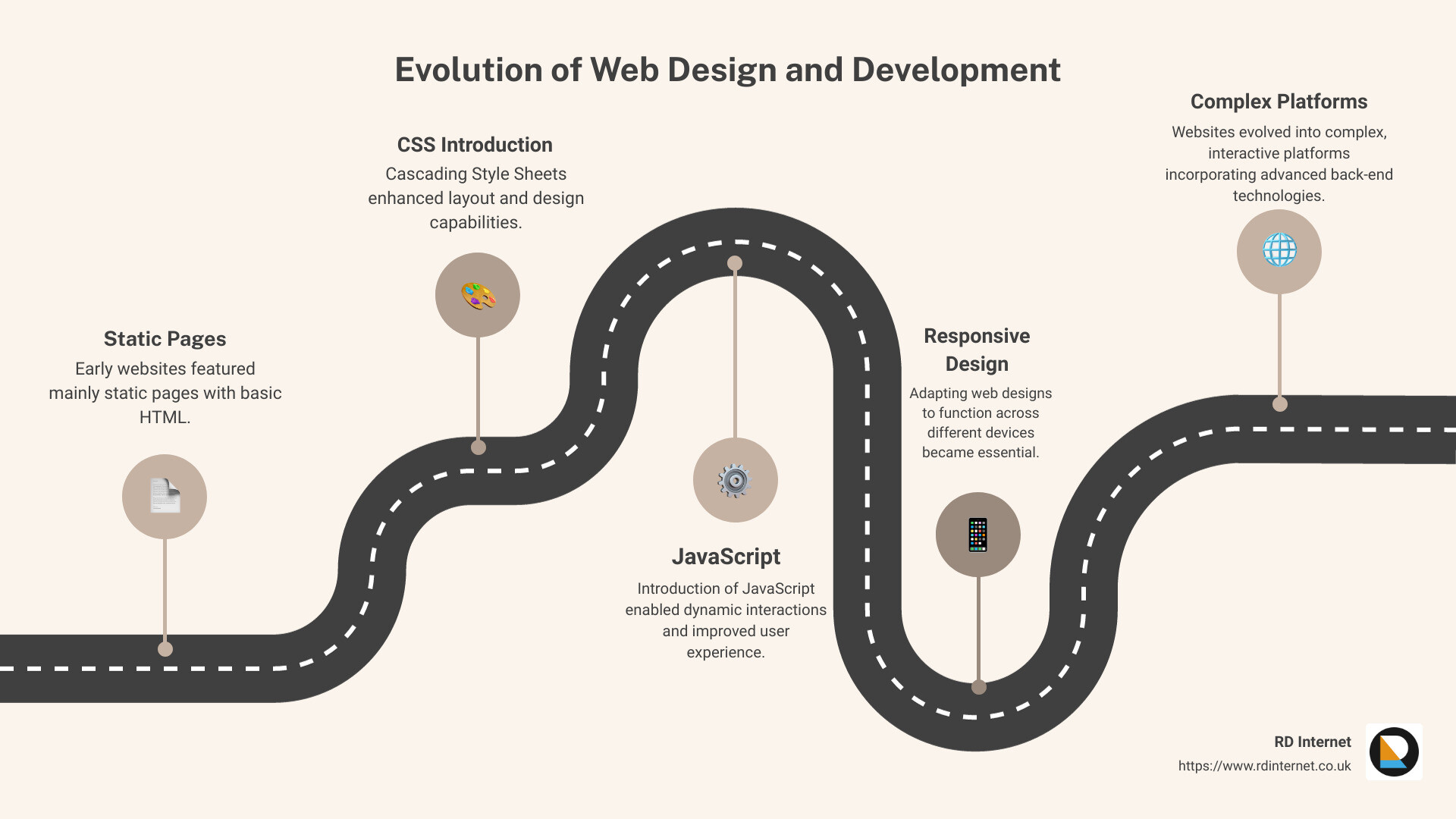
Web design and development play a crucial role in shaping how your business is perceived online. It encompasses everything from the visual appearance to the functional behavior of your site. Initially, websites were straightforward, mainly static pages. However, they have evolved into complex, dynamic platforms that engage and interact with users. This shift necessitates a blend of design finesse and technical prowess to ensure your site not only looks professional but also functions efficiently, meeting the needs of its users.
The complexity of modern web development can be daunting. With roles ranging from web designers who focus on layout and aesthetics to front-end and back-end developers who make those designs functional and interactive, understanding where you fit or who you need on your team is crucial. In this guide, we delve into each aspect, helping you understand how to synchronize design and development to create a website that attracts and retains customers.
Understanding Web Design Development
Web design development is a multifaceted field that combines the visual aspects of design with the technical aspects of development to create functional and visually appealing websites. Let’s explore the key components: Visual Aesthetics, Usability, and the Tools used to achieve these ends, including popular software like Adobe Photoshop and Illustrator.
Visual Aesthetics
Visual aesthetics are crucial in web design as they capture the visitor’s attention and help establish a brand’s identity. Effective web design uses elements such as color, layout, and typography to create a cohesive look that aligns with the brand’s message. For instance, a clean and modern aesthetic might use lots of white space and a minimalist color scheme, while a vibrant and energetic site could feature bold colors and dynamic graphics.

Usability
Usability in web design ensures that a website is user-friendly and intuitive. This involves creating a site that is easy to navigate, with information presented in a logical order. The goal is to make the user’s journey through the site as smooth as possible, from landing on the homepage to completing a desired action like making a purchase or signing up for a newsletter. Key elements include:
- Navigation: Clear and simple menus.
- Accessibility: Designing for all users, including those with disabilities.
- Responsiveness: Ensuring the site works well on devices of all sizes.
Tools for Web Design Development
The tools used in web design development can vary widely but typically include software for graphic design, coding, and project management. Here’s a look at some industry-standard tools:
- Adobe Photoshop: This is a crucial tool for creating and editing images and graphics for web design. Its robust features allow designers to manipulate layers, colors, and elements to create detailed and high-resolution visuals.
- Adobe Illustrator: Often used for creating logos and illustrations, Illustrator works with vector graphics, which are ideal for designs that need to scale without losing quality.
- Adobe Dreamweaver: A development tool that allows designers to write code and manage websites directly from the software.
Each tool serves a specific purpose in the design and development process, from creating visual elements to coding and launching the site.
Integrating Tools and Aesthetics
To effectively integrate tools and aesthetics in web design development, designers and developers must work collaboratively. For example, a designer might use Illustrator to create a logo that reflects the company’s branding, which is then coded into the website using HTML and CSS by the developer. The process is iterative and involves constant communication between the designer and developer to ensure that the visual elements align with the functional aspects of the site.
Understanding these components of web design development is essential for creating websites that are not only visually appealing but also functionally robust. By mastering the use of tools like Adobe Photoshop and Illustrator, and by applying principles of good usability, designers can create compelling and effective websites that meet the needs of today’s users.
Moving forward, we will delve into the key components of web development, exploring how coding, front-end, and back-end development play a role in bringing web designs to life.
Key Components of Web Development
Web development is a vast field that involves several critical components. Each component plays a unique role in building websites that are efficient, dynamic, and user-friendly. Let’s break down these components:
Coding
At the heart of web development is coding. Coding is the process of writing instructions for computers using programming languages. It’s what allows us to create algorithms and implement functionalities on websites. Without coding, there would be no way to instruct the server and browser on how to perform various tasks.
Front-End Development
Front-end development refers to the part of web development that involves creating the visual and interactive aspects of a website—the parts that users interact with. It uses languages like HTML, CSS, and JavaScript.
- HTML (Hypertext Markup Language) is the standard markup language used to create the structure of web pages. HTML code ensures that text, images, and other elements are properly formatted and displayed in web browsers.
- CSS (Cascading Style Sheets) is used for designing and enhancing the appearance of HTML elements. It allows developers to control layout, colors, fonts, and styles.
- JavaScript is a powerful scripting language that makes websites interactive and dynamic. It can be used for tasks such as creating animations, handling website responses based on user actions, and integrating third-party services.
Back-End Development
While front-end development is what users see, back-end development is the powerhouse behind the scene. This part of development focuses on server, application, and database management. Back-end developers work with languages like PHP, Python, and others to ensure that the server responds correctly to front-end requests, processes data, and performs the necessary operations to serve that data back to the user.
- PHP (Hypertext Preprocessor) is widely used for server-side scripting. It is powerful for creating dynamic and interactive websites.
- Python is known for its readability and efficiency. Developers use Python in web development to handle data manipulation, perform backend logic, and interface with databases effectively.
Interaction Between Front-End and Back-End
Understanding how the front-end and back-end interact is crucial. The front-end sends requests to the back-end, which processes them and sends back the necessary data. This data is then displayed on the user’s screen. For instance, when you fill out a form on a website and hit submit, the front-end sends that data to the back-end, which might store it in a database or use it to retrieve other data.
In summary, the key components of web design development involve both the visible elements that users interact with and the underlying back-end processes that handle the website’s logic and data. Mastery of both front-end and back-end languages and frameworks is essential to develop a fully functional, responsive, and interactive website. We’ll explore how these components work together to create seamless user experiences.
The Intersection of Design and Development
In web design development, the lines between design and development often blur, creating a dynamic space where collaboration and understanding across roles become crucial. Let’s delve into how these elements—overlap, collaboration, roles, and skills—interconnect to produce effective web solutions.
Overlap Between Design and Development
Design and development are not isolated disciplines; they frequently overlap. For instance, a designer needs to have a basic understanding of coding to ensure their designs are practical to implement. Similarly, developers must appreciate design principles to translate design visions into functional websites effectively. This overlap is not just beneficial but necessary for creating websites that are both aesthetically pleasing and technically sound.
Collaboration Across Disciplines
Effective collaboration between designers and developers is key to the success of web projects. It involves regular communication and shared understanding from the project’s inception through to its completion. Tools like InVision and Figma facilitate this collaboration by allowing both designers and developers to work together in real-time, providing immediate feedback and adjustments that align with both design intent and functional requirements.
Roles Within Web Design Development
The roles within web design development can vary widely but typically include:
- Web Designers who focus on the visual aspects of a website, such as layout, color scheme, and typography.
- Front-End Developers who implement the design on the web using HTML, CSS, and JavaScript.
- Back-End Developers who build the underlying systems that operate the website, such as databases and server-side logic.
Some professionals bridge these roles, known as “Full-Stack Developers,” capable of handling both front-end and back-end tasks.
Skills Necessary for Effective Integration
To effectively integrate design and development, professionals need a mix of technical and creative skills. Key skills include:
- For Designers: A strong grasp of design tools like Adobe Photoshop and Illustrator, and a basic understanding of HTML and CSS.
- For Developers: Proficiency in languages such as JavaScript, PHP, and Python, and an appreciation of good design principles.
Understanding the constraints and possibilities of each other’s roles can lead to more innovative and practical web solutions. For instance, knowing the limitations of CSS and HTML can help designers create more realistic designs that are easier for developers to implement.
In conclusion, the intersection of design and development in web design development is where much of the magic happens. By fostering a culture of collaboration and mutual understanding, teams can create more cohesive and innovative websites that stand out in the digital landscape. We’ll look into the essential tools and technologies that further support this integration.
Essential Tools and Technologies in Web Design Development
In web design development, having the right tools and technologies at your disposal can make a significant difference in the efficiency and quality of the final product. Here’s a closer look at some essential tools and technologies that every web designer and developer should be familiar with.
Wix
Wix is a popular choice for those who want to create websites quickly without deep coding knowledge. It offers a drag-and-drop interface that makes it easy to design layouts. Wix is particularly useful for small businesses and personal sites where simplicity and ease of use are paramount.
Adobe Dreamweaver
Adobe Dreamweaver combines a visual design surface known as Live View and a code editor with standard features such as syntax highlighting, code completion, and code collapsing. It’s especially handy for those who like to work on both the visual and coding aspects of web design. Dreamweaver supports numerous web technologies including HTML, CSS, JavaScript, and server-side scripting languages.
WordPress
WordPress is the most popular content management system (CMS) in the world. It’s highly customizable, thanks to thousands of themes and plugins that extend its functionality. WordPress is an excellent choice for a broad range of websites, from blogs to complex portals and enterprise websites.
Figma
Figma is a cloud-based design tool that is similar to Sketch, but with added features for team collaboration. It allows multiple team members to work on a design simultaneously, which is a huge plus in today’s remote working environment. Figma helps with designing interfaces quickly and prototyping, which can be shared across the team for immediate feedback.
HTML, CSS, JavaScript
These three technologies form the backbone of the web.
- HTML (HyperText Markup Language) is the standard markup language used to create web pages. It forms the structural part of your website, defining elements like headings, paragraphs, and divs.
- CSS (Cascading Style Sheets) is used for designing these elements. It controls the layout of multiple web pages all at once and dictates how your site will look in terms of colors, fonts, and layouts.
- JavaScript allows you to implement complex features on web pages. From updating content, controlling multimedia, animating images, to validating user input, JavaScript makes websites interactive and functional.
Understanding and utilizing these tools and technologies will not only enhance your capability to create more dynamic and responsive websites but also ensure a smoother workflow from design to development. As you integrate these tools into your projects, you’ll find that they offer a robust framework to support both the creative and technical aspects of web design development.
In the next section, we’ll delve into the best practices for effective web design development, focusing on how to optimize layout, visual hierarchy, navigation, and other key elements to enhance user experience.
Best Practices for Effective Web Design Development
When diving into web design development, it’s crucial to follow established best practices to ensure your website is not only attractive but also functional and accessible. Here, we’ll explore essential aspects such as layout, visual hierarchy, navigation, color, graphics, speed, and accessibility.
Layout
The layout forms the backbone of your website. It organizes and structures the content and interactive features in a coherent, user-friendly manner. Remember, the layout should cater to the purpose of your website. For instance, a news site might have a multi-column layout to display various headlines and categories, whereas an online store might opt for a simpler, more product-focused layout.
Visual Hierarchy
Visual hierarchy guides the visitor’s eye through a series of messages. Size, color, and placement on the page determine the prominence of visual elements. It’s about using these elements to direct attention and make the important information stand out. For example, a call-to-action button might be made larger and colored brightly to draw attention.
Navigation
Navigation is your user’s roadmap. It should be simple and intuitive. Complex or confusing navigation can lead to user frustration and high bounce rates. Tools like sticky headers, breadcrumb trails, and clear menus help users find their way and understand their own location within the site structure.
Color
Color isn’t just for aesthetics—it also influences emotions and actions. Choosing the right color palette can enhance user engagement and make the site visually cohesive. It’s essential to ensure that the color scheme aligns with your brand and is accessible to all users, including those with color vision deficiency.
Graphics
Graphics, including images, icons, and videos, should be used purposefully to support the content and enhance the user experience. High-quality, relevant graphics can help to break up text, illustrate concepts, and engage users. However, it’s crucial to optimize these graphics to ensure they don’t slow down your site.
Speed
Website speed is critical. A slow-loading site can frustrate users and drive them away. According to Akamai’s 2017 report, a two-second delay in load time can increase bounce rates by 103%. Optimizing image sizes, leveraging browser caching, and minimizing HTTP requests are effective strategies to improve loading times.
Accessibility
Accessibility ensures that your website can be used by as many people as possible, including those with disabilities. This includes providing text alternatives for non-text content, ensuring keyboard navigability, and using sufficient contrast ratios for text. Making your website accessible not only broadens your audience but also improves SEO.
Incorporating these best practices into your web design development process will not only enhance the aesthetic appeal of your site but also its functionality and user experience. We’ll look at how to plan and execute a web design development project effectively, ensuring that these principles are integrated from the start.
Planning and Executing a Web Design Development Project
When embarking on a web design development project, careful planning and strategic execution are key to success. Here’s how you can ensure your project not only meets but exceeds expectations.
Define Goals
Start by clearly defining the goals of your website. Are you aiming to increase sales, boost brand awareness, or provide customer support? Setting clear, measurable objectives early on guides the design process and helps ensure that the final product aligns with your business strategy.
Choose Platform
Selecting the right platform is crucial. Consider platforms like WordPress or Wix, which offer flexibility and a wide range of design options. Each platform has its strengths, so choose one that aligns with your technical skills and business needs.
Template Selection
Choosing the right template can dramatically affect the functionality and appearance of your site. Templates should not only look good but also be responsive and compatible with different browsers and devices. Preview templates to ensure they align with your brand and goals.
Brand Elements
Your website should reflect your brand’s identity. Consistent use of colors, fonts, and logos strengthens your brand and enhances recognition. Start with a primary color that fits your brand and use one or two complementary colors to create a balanced design.
Site Mapping
Creating a sitemap is like drawing a blueprint; it outlines the structure of your site. Decide on the number of pages, their content, and how they’ll connect. A well-planned sitemap ensures a logical flow that enhances user experience and supports your SEO efforts.
By carefully addressing each of these areas, you set a solid foundation for your web design development project. This strategic approach not only streamlines development but also ensures that the final website effectively meets your business objectives and provides a positive user experience. As we progress, we’ll delve into advanced techniques that can further enhance your site’s performance and appeal.
Advanced Techniques in Web Design Development
When diving deeper into web design development, embracing advanced techniques can significantly elevate the functionality and user engagement of your website. Let’s explore some critical areas such as Responsive Design, SEO Optimization, Dynamic Content, and Backend Integration.
Responsive Design
A website must perform flawlessly across various devices—be it desktops, tablets, or smartphones. Responsive design ensures that your site adjusts seamlessly to any screen size, improving user experience and engagement. This adaptability not only caters to user convenience but also positively impacts search rankings, as mobile-friendliness is a crucial ranking factor for search engines like Google.
SEO Optimization
To reach the right audience, your website needs to be visible on search engines. SEO Optimization involves refining your website to improve its ranking in search results. This includes optimizing page titles and meta descriptions, using appropriate keywords, and ensuring fast loading speeds. A well-optimized website attracts more traffic, which can lead to increased conversions and revenue. The goal is to design a site that not only looks good but also ranks well.
Dynamic Content
Dynamic content refers to web content that changes based on the behavior, preferences, and interests of the user. It creates a personalized user experience that can significantly boost engagement. For instance, a returning visitor might be greeted by name or shown recommendations based on previous interactions. Implementing dynamic content requires a robust backend but can greatly enhance the user’s interaction with your website.
Backend Integration
The backend of a website handles the logic, database interactions, user authentication, and server-side functions. Integrating advanced backend solutions allows for more dynamic, efficient, and personalized websites. For example, using a CMS like WordPress can simplify content updates and scalability. Advanced backend integration supports complex functionalities like e-commerce capabilities, real-time data processing, and extensive user interaction.
By implementing these advanced techniques in your web design development, you can create a more robust, efficient, and engaging online presence. Each element not only enhances the aesthetic appeal but also boosts the functionality and reach of your website, making it a powerful tool in achieving your digital goals. These techniques will continue to evolve, pushing the boundaries of what we can achieve in web development.
Web Design Development with RD Internet
When you partner with RD Internet for your web design development, you’re investing in more than just a visually appealing website. You’re gearing up for an enhanced online presence that drives increased revenue and boosts your visibility on search engines like Google and Bing. Let’s delve into how RD Internet can transform your digital strategy through effective web design and development.
SEO Optimization
At RD Internet, SEO is not an afterthought; it’s a fundamental component of the web design development process. By integrating SEO best practices from the ground up, RD Internet ensures that your website is not only user-friendly but also search engine friendly. This includes optimizing site speed, ensuring responsive design, and structuring content with the right keywords. Such optimization leads to higher rankings in search results, which is crucial since over half of all web traffic comes from organic search.
Increased Revenue
A well-designed website does more than attract visitors—it converts them into customers. RD Internet focuses on creating engaging user experiences that guide visitors through a clear journey from discovery to conversion. Whether it’s through streamlined navigation, persuasive call-to-action buttons, or intuitive design layouts, each element is crafted to boost interaction and conversions. By focusing on these aspects, RD Internet helps increase your revenue by making your site not just a digital brochure, but a powerful sales engine.
Online Visibility
Your online visibility is your business’s visibility. RD Internet leverages the power of advanced web design development techniques to ensure that your site stands out in the crowded online space. This includes implementing dynamic content that resonates with your target audience and utilizing modern design trends that make your brand memorable. Furthermore, by enhancing your site’s SEO, RD Internet increases your chances of appearing in top search results, significantly boosting your online exposure.
By choosing RD Internet for your web design development needs, you’re ensuring that your website is built on a foundation of SEO excellence, designed to maximize revenue, and optimized for greater online visibility. This strategic approach not only meets the immediate needs of your business but also sets you up for long-term success in the digital marketplace.
As we continue to explore the vast landscape of web design and development, the journey doesn’t end with the launch of your site. It’s an ongoing process of adaptation and improvement to keep pace with evolving technologies and market trends.
Conclusion
As we wrap up this comprehensive guide on web design development, it’s clear that the field is not just about creating aesthetically pleasing sites but also about crafting functional, user-friendly platforms that enhance user engagement and business performance. The intersection of design and development brings together a diverse set of skills and tools that are essential for building successful websites and applications.
Continuous Learning
In the realm of web design development, continuous learning is crucial. The digital landscape is constantly evolving, with new technologies, standards, and best practices emerging regularly. Staying updated through courses, tutorials, and industry news is vital for anyone serious about mastering this field. Engaging with community platforms like Reddit can also provide valuable insights and keep you connected with trends and challenges faced by peers.
Industry Trends
One of the most exciting aspects of web design development is the rapid pace of innovation. Recently, we’ve seen a surge in the use of AI and machine learning to automate design tasks and provide personalized experiences for users. Additionally, the push towards more accessible and inclusive web designs is shaping how developers and designers approach projects, ensuring that websites are usable for all people, regardless of their abilities or disabilities.
Future Outlook
Looking ahead, the integration of advanced technologies like voice recognition, augmented reality (AR), and virtual reality (VR) in web design is poised to transform how we interact with digital content. These technologies offer new avenues for creating immersive and interactive user experiences that could redefine the standards of web design and development.
Moreover, as the number of global internet users continues to grow, the demand for skilled web designers and developers is expected to rise. This makes it an opportune time for newcomers to enter the field and for seasoned professionals to expand their skill sets and explore new technologies and methodologies.
Frequently Asked Questions about Web Design Development
What is the difference between web design and web development?
Web design primarily focuses on the visual aspects and user experience of a website, utilizing tools like Adobe Photoshop and Illustrator to create layouts and graphics. In contrast, web development involves building and maintaining the site’s core structure using programming languages such as HTML, CSS, JavaScript, and PHP. Both roles are crucial and often interdependent, making collaboration between designers and developers essential for a successful project.
How can good web design development improve business performance?
Effective web design development enhances user engagement, accessibility, and satisfaction, which are key factors in improving business performance. A well-designed website can help in building trust and credibility, increasing conversions, and retaining customers. Additionally, incorporating SEO best practices in design and development can boost a site’s visibility on search engines, driving more organic traffic and potential sales.
What are the latest trends in web design development?
Currently, minimalist designs, mobile-first approaches, and the use of bold, expressive colors are trending in the web design world. In development, the rise of Progressive Web Apps (PWAs) and API-first design signifies a shift towards more dynamic, application-like web experiences. Sustainability in web design, focusing on reducing the carbon footprint of digital products, is also gaining traction as an important consideration.
In conclusion, the field of web design development is dynamic and offers endless opportunities for creativity and innovation. Whether you are just starting out or are looking to deepen your expertise, embracing the continuous learning curve and staying abreast of industry trends will be key to your success in this exciting industry.
Recent Comments