

Introduction
If you’re seeking to understand how to learn web design and development, start with the foundation: HTML and CSS are your building blocks, and mastering them will enable you to create visually appealing and functional websites. For small business owners in Cardiff looking to enhance their online presence, getting a grasp on these fundamentals can set you apart in the digital marketplace.
Web design encompasses both the aesthetic portion of the website and its usability. Development involves the more technical side, focusing on how the site works and operates. Both areas work closely together in the creation of dynamic, responsive websites that meet user needs and project your business’s brand effectively.
- Web Design: Learn to combine colors, graphics, and layouts to enhance user experience.
- Web Development: Understand the structure of websites using HTML and develop style and appearance with CSS.
- Visual Design: Focus on refining graphic details to make your site stand out.
Starting your journey in web design and development can seem daunting, but by focusing on these essentials, you can begin to craft engaging online platforms. Practical application of these skills will help cement your knowledge and grow your business’s digital footprint.
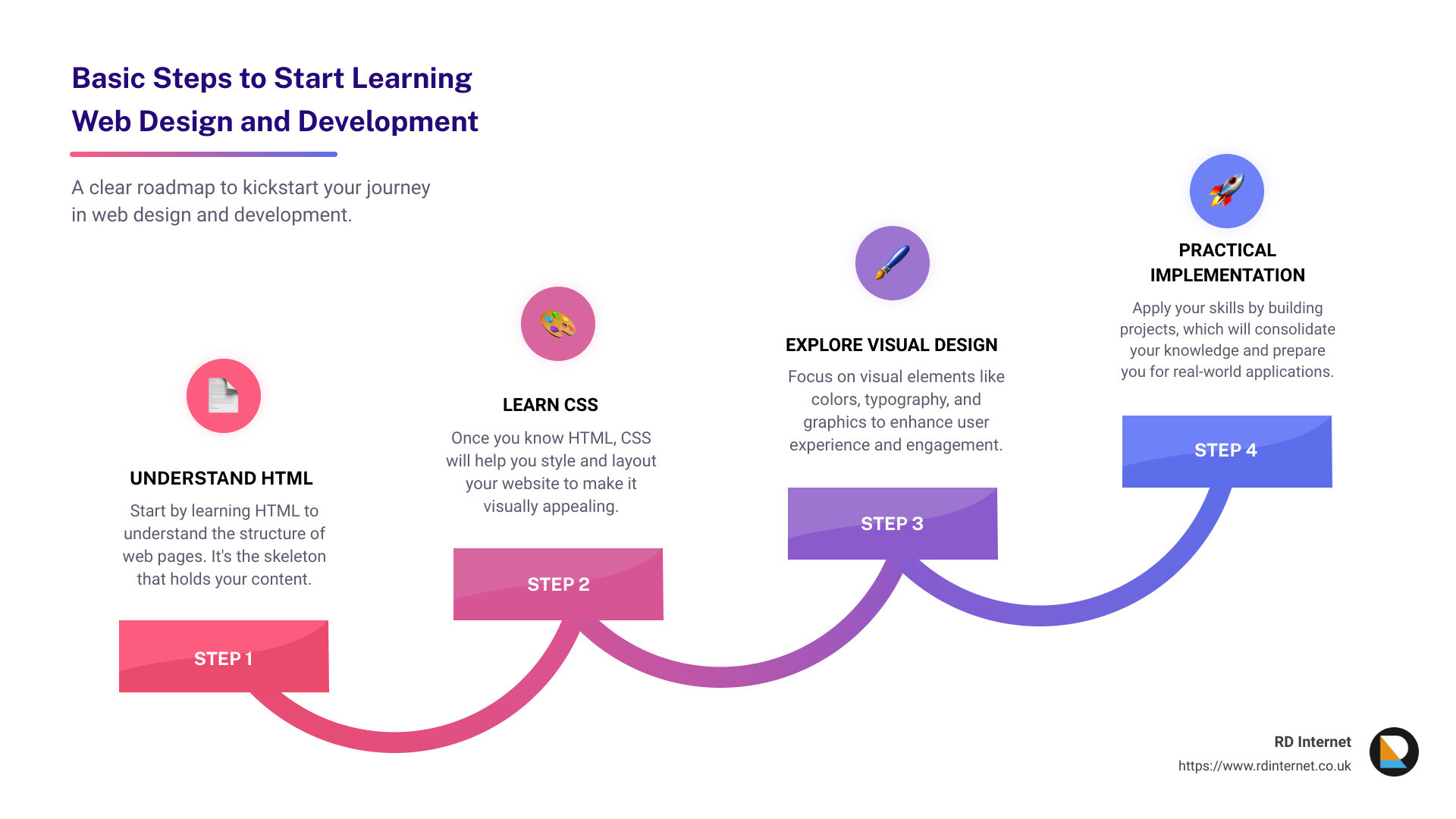
Understanding Web Design and Development
When diving into how to learn web design and development, it’s crucial to grasp the core components and how they interact to create functional, visually appealing websites. This section explores essential topics such as Web development, Web design, HTML, CSS, JavaScript, UX design, and UI design.
Web Development
Web development involves the technical aspects of building websites, primarily dealing with coding and programming. From creating simple static pages to complex web applications, web development covers a broad spectrum. It’s essential for implementing the functionality of web elements and ensuring they operate smoothly across different platforms and devices.
Web Design
Web design focuses on the aesthetics and user experience of a website. It involves planning and building the elements of the website, ensuring that the site is visually engaging and easy to navigate. Tools like Mockplus and Figma allow designers to prototype designs efficiently, even without deep coding knowledge.
HTML and CSS
At the heart of web design and development are HTML (HyperText Markup Language) and CSS (Cascading Style Sheets). HTML provides the basic structure of sites, which is enhanced and modified by CSS to create visual styles and layouts. Understanding these languages is crucial:
- HTML structures content on the web, such as text, images, and videos.
- CSS styles these elements with fonts, colors, and layouts.
Both are foundational for building responsive and attractive web pages.
JavaScript
JavaScript adds interactivity to web pages, allowing for dynamic content changes without needing to reload the page. It’s essential for creating engaging user experiences and is often used alongside HTML and CSS.
UX Design
User Experience (UX) design is about enhancing user satisfaction by improving the usability, accessibility, and pleasure provided in the interaction with the product. UX design involves research to understand behaviors and needs, design iteration, and usability testing to create products that solve users’ problems.
UI Design
User Interface (UI) design focuses on the look and layout of a product. A UI designer ensures every visual element feels united, both aesthetically, and in purpose. An effective UI design promotes an intuitive and seamless interaction with the website.
By understanding and integrating these components, you can start to see how various roles and skills converge to create comprehensive web experiences. Whether you are more inclined towards the technical aspects of web development or the creative aspects of web design, mastering these areas will provide a strong foundation for your career in this field.
As you continue to learn and apply these skills, practical experience, such as building projects and experimenting with different design and development tools, plays a crucial role in deepening your understanding and expertise.
With these fundamentals, you’re well-prepared to dive deeper into the more complex aspects of web design and development, ensuring you can handle projects that require a robust combination of technical and creative skills. Let’s move on to explore the tools and resources that can aid your learning journey.
Key Concepts in Web Design
Visual Design
Visual design focuses on the aesthetics of a site and its related materials by strategically implementing images, colors, fonts, and other elements. A strong visual design aims to improve user experience and enhance usability with a logical layout, engaging graphics, and appropriate color schemes. To master visual design, start by understanding the basics of color theory, symmetry, and balance.
HTML Basics
HTML (HyperText Markup Language) is the backbone of any web page. It’s essential for structuring content on the web. Learning HTML involves understanding how to use tags and elements to organize and structure text, images, and other forms of content. Simple tutorials and resources like Webflow University can provide beginners with the necessary skills to start crafting basic web pages.
CSS Fundamentals
CSS (Cascading Style Sheets) allows you to style and layout your web pages. For example, you can change the color, fonts, and spacing of your HTML elements. It’s crucial to grasp selectors, properties, values, and how they interact to style your HTML content effectively. CSS combo classes and the concept of CSS specificity are also important to learn for efficient styling practices.
UX Foundation
User Experience (UX) design is about making your website functional and pleasant for the user. It involves planning the user journey, which includes how they interact with interface elements and navigate through content. Learning about user personas, wireframes, and user flows can greatly enhance the effectiveness of a website.
UI Principles
User Interface (UI) design focuses on the interactive elements of a website. This can include buttons, text fields, and other navigational elements. Key UI principles involve creating intuitive interfaces that are easy for users to understand and interact with, ensuring that the design is simple and effective.
Layout Creation
Understanding how to create layouts is fundamental in web design. Knowledge of layout patterns like F-patterns and Z-patterns can help in organizing content in a way that naturally draws attention to the most important elements. Responsive design is also a critical aspect, ensuring that your website looks good on all devices from desktops to smartphones.
Typography
Typography involves choosing and arranging type to make the text legible and appealing on the web. This includes selecting typefaces, point sizes, line lengths, line-spacing, and letter-spacing. Understanding the difference between serif and sans-serif fonts and when to use each can help improve the readability and aesthetics of your website.
Building Projects
Finally, the best way to learn web design is by building projects. Start small with simple web pages and gradually move to more complex web designs. This practical application of your skills will solidify your knowledge and allow you to experiment with different design concepts and technologies.
By mastering these key concepts, you can begin to understand how to learn web design and development effectively. Each element from HTML basics to complex UX design plays a crucial role in creating a successful web presence. As you continue to learn and apply these skills, practical experience, such as building projects and experimenting with different design and development tools, plays a crucial role in deepening your understanding and expertise.
With these fundamentals, you’re well-prepared to dive deeper into the more complex aspects of web design and development, ensuring you can handle projects that require a robust combination of technical and creative skills. Let’s move on to explore the tools and resources that can aid your learning journey.
Tools and Resources for Learning
When embarking on the journey of how to learn web design and development, having the right tools and resources can make a significant difference. Here’s a breakdown of some powerful platforms and communities that can help you enhance your skills:
Udemy
Udemy is a popular online learning platform where you can find a wide range of courses on web design and development. Whether you’re a beginner looking to understand the basics of HTML and CSS or an advanced developer seeking to master JavaScript, Udemy has courses tailored to all levels. The platform offers both free and paid courses, often complete with video tutorials, quizzes, and practical projects to help solidify your learning.
YouTube
YouTube is an invaluable free resource where you can access countless tutorials and lectures on web design and development. Channels like Traversy Media and The Net Ninja are renowned for their high-quality content that covers everything from basic web design principles to advanced programming languages. The visual and practical nature of video tutorials makes complex topics more digestible.
Webflow University
Webflow University is perfect for those who prefer learning through a structured, course-based approach. It offers comprehensive tutorials on using the Webflow platform to build responsive websites without deep coding knowledge. This is particularly useful for designers who want to implement their visual ideas quickly and efficiently.
Dribbble
Dribbble is a community of designers showcasing their work. It’s a great place to find inspiration and understand current design trends. By studying the designs featured on Dribbble, you can learn about color theory, typography, and more. Moreover, recreating these designs can be a practical exercise to improve your skills.
Reddit hosts a variety of communities where you can discuss web design and development topics, get feedback on your projects, and connect with both novices and experts. Subreddits like r/web_design and r/webdev are particularly useful. You can ask questions, share resources, and learn from the experiences of others in the field.
Quora
Quora allows you to ask questions and receive answers from experienced practitioners. It can be a great place to clarify doubts or get diverse opinions on web design and development topics. Since responses are often detailed and given by experts, you can gain deep insights that are hard to find elsewhere.
By leveraging these platforms, you can access a wealth of knowledge and community support, which are crucial for both learning and staying updated in the fast-evolving field of web design and development. The key to mastery is not just consuming information but also applying it in practical projects and real-world scenarios. As you continue to explore these tools and resources, keep experimenting and building to refine your skills and understanding.
Practical Steps to Start Designing
Starting your journey in web design and development can seem overwhelming, but by breaking it down into manageable steps, you can make significant progress quickly. Here’s how to begin:
Understand Key Concepts
Before diving into the tools and code, grasp the fundamental concepts of web design and development. This includes understanding how websites function, the basics of web hosting, and the roles of HTML, CSS, and JavaScript in creating web pages. Webflow University is a great resource to start with, offering beginner-friendly courses that cover these topics extensively.
Learn HTML
HTML is the skeleton of all web pages. It’s essential for structuring content on the web. Start by learning to define headings, paragraphs, links, images, and other elements using HTML. There are plenty of free resources available online, including YouTube tutorials and interactive platforms like Codecademy.
Understand CSS
Once you know how to structure a web page with HTML, the next step is making it look good with CSS. CSS controls the layout and appearance of the websites. Learn how to manipulate colors, fonts, and spacing, and how to implement flexbox and grid systems for complex layouts. CSS-Tricks is an excellent website for learning CSS with easy-to-understand examples.
Foundation of UX
User Experience (UX) is about how a person feels when interacting with a digital product. Familiarize yourself with basic UX principles such as usability, accessibility, and user-centric design. Nielsen Norman Group offers detailed articles and guidelines on various aspects of UX design.
Familiarize with UI
User Interface (UI) design is closely tied to UX. It focuses on the visual elements that users interact with. Learn about button design, typography, color schemes, and form design. Tools like Adobe XD and Sketch can help you craft beautiful, functional interfaces.
Basics of Layouts
Understanding how to effectively layout content on a screen is crucial. Learn about visual hierarchy, alignment, and balance to ensure your designs are both aesthetically pleasing and easy to navigate. Canva’s Design School offers free tutorials on these topics.
Typography
Typography is a critical aspect of web design. It not only makes your site look attractive but also contributes to readability and user experience. Learn about font selection, type scaling, and spacing. Google Fonts is a useful resource for exploring and experimenting with different typefaces.
Build Something
Put your knowledge into practice by building a simple website. Start with something small like a portfolio site or a single-page application. This practical experience will help you understand the web development process and how different elements work together.
Get a Mentor
Having a mentor can accelerate your learning process. Look for experienced designers or developers who are willing to share their knowledge. Join online communities like Reddit or LinkedIn to connect with potential mentors and peers who can provide guidance and feedback.
By following these steps, you’ll not only learn how to learn web design and development but also start building your own projects and portfolio. The key to becoming proficient is consistent practice and always staying curious about new techniques and technologies.
Frequently Asked Questions about Web Design and Development
What is the difference between web design and web development?
Web design and web development are two sides of the same coin, yet they involve different skill sets and focus areas. Web design is about the visual and interactive aspects of a website. It involves creating a pleasing aesthetic and user-friendly interface, which includes choosing color schemes, layout, and typography. Tools like Figma and Sketch are often used by designers to create the look and feel of a website.
On the other hand, web development deals with the coding and programming that powers the website’s functionality. This includes everything from the simple HTML and CSS to more complex languages like JavaScript, PHP, and Python that make the website operational. Web developers may use frameworks like React or Angular to build dynamic and responsive websites.
How long does it take to learn web design and development?
The time it takes to learn web design and development can vary widely based on several factors, including your starting skill level, the complexity of the web technologies you wish to master, and how much time you dedicate to learning. Generally, you can expect to:
- Understand basic web design (including HTML and CSS) in a few months if you study part-time.
- Gain proficiency in more complex tools and languages like JavaScript or backend programming in a year or more of consistent study.
Courses like “Web Design for Everybody” on Coursera can provide a structured learning path. The more you practice and build real projects, the quicker you’ll learn.
Can I learn web design and development for free?
Yes, there are numerous resources available online that can help you start learning web design and development for free. Websites like Codecademy, Coursera, and YouTube offer tutorials and courses at no cost. For instance, you can find introductory courses on HTML, CSS, and even JavaScript online.
Additionally, communities such as GitHub and forums on Reddit provide support and project ideas from other learners and seasoned developers. These platforms can be invaluable for getting feedback and finding solutions to common problems.
By leveraging these free resources and engaging with the community, you can build a strong foundation in both web design and web development without financial investment.
As you continue to explore how to learn web design and development, practical experience, consistent practice, and community engagement are key to your success. Whether you’re sketching your first design or coding your first function, each step is a learning opportunity.
Conclusion
As we wrap up our guide on how to learn web design and development, emphasize the importance of a structured approach and the right resources. At RD Internet, we are committed to helping beginners and seasoned professionals alike enhance their skills in this dynamic field.
Web design and development is not only about learning the technical skills like HTML, CSS, and JavaScript but also about understanding the principles of design, user experience, and user interface. These elements are crucial in creating websites that are not only functional but also engaging and user-friendly.
One of the most effective ways to master these skills is through practical application. Start by building small projects, experimenting with different design elements, and gradually increasing the complexity of your work. This hands-on approach will solidify your understanding and boost your confidence.
Moreover, staying updated with the latest trends and technologies is vital in this changing industry. Regularly visiting educational platforms, following industry leaders on social media, and participating in web design and development communities can provide you with the insights and motivation needed to keep your skills sharp and relevant.
At RD Internet, we offer a range of services and resources that support your learning journey in web design and development. Whether you’re looking to understand the basics or advance to more complex concepts, our expert team is here to guide you every step of the way.
The road to becoming proficient in web design and development is a continuous learning process. Each project you undertake enhances your skills and deepens your understanding. With dedication, practice, and the right resources, you’ll be able to create compelling, user-centric websites that stand out in the digital landscape.
We encourage you to explore further, challenge yourself with new projects, and never hesitate to reach out for guidance. Your journey in web design and development is just beginning, and at RD Internet, we’re excited to be a part of it. Let’s build something great together!
Recent Comments